Clinton admitted to hospital with blood clot

Secretary of State Hillary Rodham Clinton has been admitted to a New York hospital for treatment of a blood clot, her spokesman said Sunday.
State Department Spokesman Philippe Reines said Clinton had entered the hospital following a medical examination for a concussion she sustained earlier this month.
"In the course of a follow-up exam today, Secretary Clinton's doctors discovered a blood clot had formed, stemming from the concussion she sustained several weeks ago," Reines said in a statement. "She is being treated with anti-coagulants and is at NewYork-Presbyterian Hospital so that they can monitor the medication over the next 48 hours."
"In the course of a follow-up exam today, Secretary Clinton's doctors discovered a blood clot had formed, stemming from the concussion she sustained several weeks ago," Reines said in a statement. "She is being treated with anti-coagulants and is at NewYork-Presbyterian Hospital so that they can monitor the medication over the next 48 hours."
Reines added, "Her doctors will continue to assess her condition, including other issues associated with her concussion. They will determine if any further action is required."
Clinton was scheduled to return to work this week after treatment for the concussion. She is set to step down from her post shortly after President Barack Obama's inauguration on January 21. Last week, Obama announced he had chosen Massachusetts Sen. John Kerry to replace Clinton as the nation's top diplomat.
Obama wants gun violence measures passed in 2013
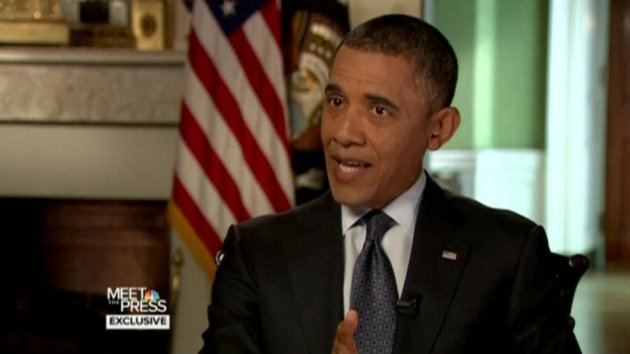
WASHINGTON (AP) — Recalling the shooting rampage that killed 20 first graders as the worst day of his presidency, President Barack Obama pledged to put his "full weight" behind legislation aimed at preventing gun violence.
Obama voiced skepticism about the National Rifle Association's proposal to put armed guards in schools following the Dec. 14 tragedy at Sandy Hook Elementary School in Newtown, Conn. The president made his comments Saturday in an interview that aired Sunday on NBC's "Meet the Press."
Instead, the president vowed to rally the American people around an agenda to limit gun violence, adding that he still supports increased background checks and bans on assault weapons and high-capacity bullet magazines. He left no doubt it will be one of his top priorities next year.
"It is not enough for us to say, 'This is too hard so we're not going to try,'" Obama said.
"I think there are a vast majority of responsible gun owners out there who recognize that we can't have a situation in which somebody with severe psychological problems is able to get the kind of high capacity weapons that this individual in Newtown obtained and gun down our kids," he added. "And, yes, it's going to be hard."
The president added that he's ready to meet with Republicans and Democrats, anyone with a stake in the issue.
The schoolhouse shootings, coming as families prepared for the holidays, have elevated the issue of gun violence to the forefront of public attention. Six adult staff members were also killed at the elementary school. Shooter Adam Lanza committed suicide, apparently as police closed in. Earlier, he had killed his mother at the home they shared.
The tragedy immediately prompted calls for greater gun controls. But the NRA is strongly resisting those efforts, arguing instead that schools should have armed guards for protection. Some gun enthusiasts have rushed to buy semiautomatic rifles of the type used by Lanza, fearing sales may soon be restricted.
Obama seemed unimpressed by the NRA proposal. "I am skeptical that the only answer is putting more guns in schools," he said. "And I think the vast majority of the American people are skeptical that that somehow is going to solve our problem."
The president said he intends to press the issue with the public.
"The question then becomes whether we are actually shook up enough by what happened here that it does not just become another one of these routine episodes where it gets a lot of attention for a couple of weeks and then it drifts away," Obama said. "It certainly won't feel like that to me. This is something that - you know, that was the worst day of my presidency. And it's not something that I want to see repeated."
Separately, a member of the president's cabinet said Sunday that rural America may be ready to join a national conversation about gun control. Agriculture Secretary Tom Vilsack said the debate has to start with respect for the Second Amendment right to bear arms and recognition that hunting is a way of life for millions of Americans.
But Vilsack said Newtown has changed the way people see the issue. "I really believe that this is a different circumstance and a different situation," Vilsack said on CNN.
Vilsack said he thinks it's possible for Americans to come together. "It's potentially a unifying conversation," he said. "The problem is that these conversations are always couched in the terms of dividing us. This could be a unifying conversation, and Lord knows we need to be unified."
Besides passing gun violence legislation, Obama also listed deficit reduction and immigration as top priorities for 2013. A big deficit reduction deal with Republicans proved elusive this month, and Obama is now hoping Senate Democratic and Republican leaders salvage a scaled-back plan that avoids tax increases for virtually all Americans.
In addition, he issued a defense of former Republican Sen. Chuck Hagel of Nebraska, who has been mentioned as one of the leading candidates to replace Leon Panetta as defense secretary.
Hagel supported the 2002 resolution approving U.S. military action in Iraq, but later became a critic of the war. He has been denounced by some conservatives for not being a strong enough ally of Israel. Also, many liberals and gay activists have banded against him for comments he made in 1998 about an openly gay nominee for an ambassadorship.
Obama, who briefly served with Hagel in the Senate, stressed that he had yet to make a decision but called Hagel a "patriot."
Hagel "served this country with valor in Vietnam," the president said. "And (he) is somebody who's currently serving on my intelligence advisory board and doing an outstanding job."
Obama noted that Hagel had apologized for his 14-year-old remark on gays.
Hidden Powers of Your Mouse
You use your mouse for just about everything: you drag, you drop, you highlight, you scroll. But even if you click your mouse a thousand times a day, I bet I've got a few secret mouse tricks you've never heard of.
Click Tricks
You surely know that double clicking highlights a word, and you might even know that triple clicking highlights a paragraph. But have you ever wanted to select a column of text in a Word document, without getting all the text to the left and right of it? Here's how you can: Hold down the alt and left mouse button (on a Mac, option-left mouse), and drag the cursor over the section you want to select. The coolest thing about this trick is that the text you are selecting does not even need to be formatted as a column for this to work.
You surely know that double clicking highlights a word, and you might even know that triple clicking highlights a paragraph. But have you ever wanted to select a column of text in a Word document, without getting all the text to the left and right of it? Here's how you can: Hold down the alt and left mouse button (on a Mac, option-left mouse), and drag the cursor over the section you want to select. The coolest thing about this trick is that the text you are selecting does not even need to be formatted as a column for this to work.
Scroll Tricks
Most mice have a scroll wheel. Sure, it takes you up and down on a page, but in combination with other keys, it can do much more:
Most mice have a scroll wheel. Sure, it takes you up and down on a page, but in combination with other keys, it can do much more:
- Scroll sideways: In many versions of Excel, holding down the shift key while scrolling will take you sideways. That's super helpful in a big spreadsheet.
- Scroll wheel as back button: In most web browsers, if you hold the shift key while using the scroll wheel, it works like the back button: You can fly through all the sites you've recently visited. (Some mice have side buttons that work like back and forward buttons in your browser, too.)
- Scroll to zoom: Holding ctrl and scrolling lets you zoom in or out of the page you're viewing. Ctrl-scroll up zooms you in; ctrl-scroll down zooms you back out. On a Mac, this trick will zoom in and out your whole screen, not just the document you're in.
Windows-Specific Tricks
While most of the tricks I've listed so far work in either Windows or Mac OS, here are a few that are specific to Windows machines:
While most of the tricks I've listed so far work in either Windows or Mac OS, here are a few that are specific to Windows machines:
- To maximize a window: drag the title bar to the top.
- To minimize all windows except the active window: "Shake" the title bar. Then if you want to restore all the windows you just minimized with this shortcut, just click again on the title bar of the window in view.
- To view two windows in a 50-50 split: Drag the title bar of one document to the left edge of your screen, then drag a second document to the right edge; they will snap into position in a nifty side-by-side view.
Bonus Sneaky Trick
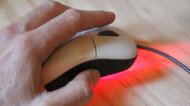
Suppose you want to walk away from your hyper-secure work computer for a few minutes and not have to re-log in when you get back. Sure, you could change the sleep settings, but this idea is much more clever: Set your mouse on top of your analog watch or a clock. The mouse tracks the second hand's movement and it tricks your computer into thinking you're still busy working. Of course, there are valid security reasons for NOT using this trick, but I still think it's cool that it works.
Suppose you want to walk away from your hyper-secure work computer for a few minutes and not have to re-log in when you get back. Sure, you could change the sleep settings, but this idea is much more clever: Set your mouse on top of your analog watch or a clock. The mouse tracks the second hand's movement and it tricks your computer into thinking you're still busy working. Of course, there are valid security reasons for NOT using this trick, but I still think it's cool that it works.
8 Microsoft Word Shortcuts You Probably Don’t Know
Microsoft Word: Love it or hate it, practically everyone uses it. I've been using it so long, I thought I knew everything about it. But I stumbled across some super helpful shortcuts — hidden tricks and timesavers that make Microsoft Word easier and faster.
One caveat for these tips: different versions of Word may have different commands, so some of these may not work in your version. That said, here are my top eight shortcuts:
1. Double Click And Drag
If you're like most people, when you want to move a section of text from one place to another, you use Control-C to copy and Control-V to paste. That's fine. It works. But there's a faster way: Double click or highlight what you want to move, then simply drag what you've highlighted to where you want it to land.
If you're like most people, when you want to move a section of text from one place to another, you use Control-C to copy and Control-V to paste. That's fine. It works. But there's a faster way: Double click or highlight what you want to move, then simply drag what you've highlighted to where you want it to land.
2. Double Underline
You know you can affect text by hitting Control-B to make it bold or Control-U to underline. But if one line of underlining just isn't emphatic enough, Control-Shift-D will double underline. (On a Mac, use Command-Shift-D.)
You know you can affect text by hitting Control-B to make it bold or Control-U to underline. But if one line of underlining just isn't emphatic enough, Control-Shift-D will double underline. (On a Mac, use Command-Shift-D.)
If that doesn't make your point, you may have to go to ALL CAPS, and I've got a shortcut for that too…
3. Change CaseChange Case button
Instead of retyping everything to change from lower case to Title Case or to UPPERCASE, just highlight the text you want to change, click the case button, and then choose which case you want.
Instead of retyping everything to change from lower case to Title Case or to UPPERCASE, just highlight the text you want to change, click the case button, and then choose which case you want.
4. Adding Buttons to Your Toolbar
Suppose you just tried using shortcut #3, but the case button isn't on your toolbar, no worries; you can add it (and almost any other command). Go to View, Toolbars, Customize Toolbars, Commands, then scroll to find the command you want — and drag it to where on the toolbar you want it.
Suppose you just tried using shortcut #3, but the case button isn't on your toolbar, no worries; you can add it (and almost any other command). Go to View, Toolbars, Customize Toolbars, Commands, then scroll to find the command you want — and drag it to where on the toolbar you want it.
4. Adding Buttons to Your Toolbar
Suppose you just tried using shortcut #3, but the case button isn't on your toolbar, no worries; you can add it (and almost any other command). Go to View, Toolbars, Customize Toolbars, Commands, then scroll to find the command you want — and drag it to where on the toolbar you want it.
Suppose you just tried using shortcut #3, but the case button isn't on your toolbar, no worries; you can add it (and almost any other command). Go to View, Toolbars, Customize Toolbars, Commands, then scroll to find the command you want — and drag it to where on the toolbar you want it.
5. Add the Date
How many times a day do you type the date? If you do it even once, that's too much. Next time, just hit Alt-Shift-D (or Control-Shift -D on a Mac) to add the date automatically.
How many times a day do you type the date? If you do it even once, that's too much. Next time, just hit Alt-Shift-D (or Control-Shift -D on a Mac) to add the date automatically.
6. Quick Parts
This next tip builds on what the Autotext function did in older versions of Word: If you have a certain paragraph of text you regularly need to add to a document — like a boilerplate disclaimer, or maybe directions to your office — turn it into a Quick Part. Here's how:Quick Parts
This next tip builds on what the Autotext function did in older versions of Word: If you have a certain paragraph of text you regularly need to add to a document — like a boilerplate disclaimer, or maybe directions to your office — turn it into a Quick Part. Here's how:Quick Parts
- Highlight the text you regularly use
- Click the insert tab
- Hit Quick Parts, and choose "Save Selection To The Quick Part Gallery"
Now any time you want to insert that chunk of text into a document, either a new one or and old one you're editing, just hit that Quick Parts button. Just one more click will select which saved Quick Part to insert. This trick will even work as a shortcut for adding a logo or letterhead.
7. Conform Fonts
This one used to drive me crazy: I'd copy and paste some bit of text from another document or from the Web, and then I'd have to click all over the place to get the font size and style to match the surrounding text of my existing document. No longer. Here's all you need to do: Highlight the non-conforming text, then hit Control-Spacebar. Done.
This one used to drive me crazy: I'd copy and paste some bit of text from another document or from the Web, and then I'd have to click all over the place to get the font size and style to match the surrounding text of my existing document. No longer. Here's all you need to do: Highlight the non-conforming text, then hit Control-Spacebar. Done.
8. Customize Quick Access Toolbar
There is one way to get your most commonly used commands in the same place- that's to customize the Quick Access Toolbar. It's like the center drawer in your desk that has all the stuff you use most in one easy-to-access place. No organization, just (as the name implies) quick access. So take the things you like most and add them to the Quick Access toolbar. Click the little down arrow tab to get to the Customize Quick Access Toolbar drop down menu.
Hit "more commands" and add whatever you use most. You can also position this toolbar below the ribbon if you prefer it to be closer to your document text.
Whale of a tale: Pakistani fishmonger now pop star

Associated Press/Hamza Ali - In this picture taken on Thursday, Dec. 27, 2012, Pakistani fans receive Muhammad Shahid Nazir, center, who sings "One Pound Fish," upon his arrival from London at Lahore airport
ISLAMABAD (AP) — Muhammad Shahid Nazir is a testament to the age-old adage that if you give a man a fish, he will eat for a day, but if you teach a man to sing about fish, his song will shoot up the British pop chart.
The 31-year-old Pakistani fishmonger catapulted to fame in recent weeks in the unlikeliest of circumstances: while hawking frozen snapper and mackerel for one British pound ($1.61) at Queens Market in London.
Not comfortable with shouting about his merchandise to attract customers, as many vendors do, he came up with a simple ditty that someone caught on video and posted on YouTube earlier this year. It became a viral sensation and has been viewed over 7 million times.
"One Pound Fish changed my whole life," said Nazir, who returned to Pakistan on Thursday to a hero's welcome and has been inundated with requests to perform and do advertisements. "I am so happy now."
To describe the song as catchy would be a gross understatement. It drills deep into your brain and sits like a lyrical jack-in-the box that goes off every few minutes, causing one to break into song involuntarily to the amusement, or perhaps growing despair, of those nearby.
"Come on ladies, come on ladies, one pound fish! Have a, have a look, one pound fish!" sings Nazir, as he points to his wares behind him. "Very, very good, one pound fish! Very, very cheap, one pound fish!"
In an era in which the Internet seems to bestow almost everyone with 15 minutes of fame, Nazir's YouTube video could have been the end of the story. But Warner Music offered Nazir a deal to record a techno-infused version of "One Pound Fish," he said. In a Bollywood-style video, he performs in a snazzy suit alongside scantily-clad dancers to a South Asian-influenced pop beat.
The music video has been viewed nearly 9 million times since it was posted on YouTube about three weeks ago. As the song gained momentum, people began talking about it as a serious contender for the fabled No. 1 Christmas single in the United Kingdom — the song that tops the chart in the week the holiday falls. Past chart-toppers include The Beatles' "I Want to Hold Your Hand" and Whitney Houston's "I Will Always Love You."
In the end, "One Pound Fish" made it to No. 29 on the top-40 chart. It was beaten by another Internet sensation, PSY's "Gangnam Style," which clocked in at No. 6. The No. 1 spot was clinched by a version of the Hollies' "He Ain't Heavy, He's My Brother" by The Justice Collective, a group of star musicians who recorded the charity single for victims of a stampede at a soccer stadium in 1989 that killed 96 people.
Nazir definitely doesn't view missing out on the No. 1 Christmas single as a setback. He has returned to his home country to get a visa for France for the release of his hit song there and also has plans to take "One Pound Fish" to the United States, where he hopes it will make a big splash.
It has been quite a ride. He grew up in the little-known town of Pattoki near the eastern city of Lahore. His father owned a transport company, but his passion was always music, and he spent his youth singing both religious songs and pop hits by stars like Michael Jackson.
He traveled to Britain to study but eventually got a work permit and started working as a fishmonger in London nine months ago, he said. He now wants to pursue a career in music, but the fish stall inLondon will always hold a special place in his heart.
"I can't forget England, Queens Market, my fish stall because that place changed my whole life," said Nazir.
Inside Justin, Selena, Taylor, and Harry’s Ski Getaway

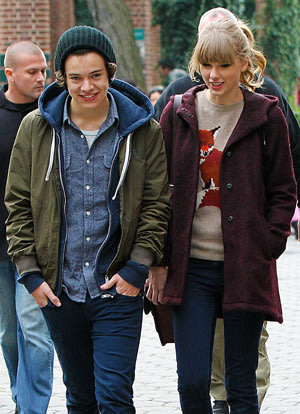
It was a pop music fan’s dream when Justin Bieber and on-again girlfriend Selena Gomez, along with her BFF Taylor Swift and her boyfriend Harry Styles, went on a ski vacation in Park City, Utah, this past weekend. According to People, the four stayed in separate rental houses at the resort town's The Colony.
Naturally, during the day they took to the powdery slopes. Swift, 23, and her One Direction BF, who's just 18, were veteran skiers, and reportedly lunched at the Red Pine Lodge. Meanwhile, Gomez, 20, took a ski lesson, and Bieber, 18, took his bodyguards along while he snowboarded.
Gomez and Swift are such close friends that Swift even gushed about her gal pal in an interview with"Extra" last month. "She's like my sister," Swift said. "We've been in each other's lives for so much and for so long that it's amazing when we're both in the same place to get to catch up."
Wonder how their heartthrob beaus, Bieber and Styles, get along….


